It is obvious that English has its origin in Britain. It started out as one of low-profile European languages. As the British Empire prospered, English also spread across the world. It has been spoken as one of the official languages in the former British colonies since then. After Britain had lost its power, the United States overtook the dominance over the world. Even though there's signs of American power decreasing, US is still the world's most influential nation in terms of technology and international regulations.
Historically speaking, British people used to be Caucasian people with their distinct culture. However, the characteristic has got blurred because of the large scale introduction of immigrants from the rest of the world. US began its history as British colonies. Even after its independence, US was a country where white people are dominant for many years. But now Caucasians are increasingly becoming a minority - its population has been largely replaced by people other than Caucasians such as Hispanics, Asians and Africans.
Therefore, we have to be aware of the fact that, even though Britain and US are still the leading countries in the English speaking world, many members consisting of them are no longer traditional "white" people. English is becoming a global language, which is now spoken by many different people with different backgrounds.
Usually a language is spoken in a certain cultural context. English is not an exception. English is still strongly associated with the cultures of Britain and US. As a Japanese person, I find some difficulty in accepting certain aspects of the British or American culture. Probably, if English wishes to be a truly global language, it should be more culturally neutral. Or it should be tailored to the situations of each region where it is spoken. For example, English should be customized to accommodate the needs of Japanese people when it is spoken in Japan. New vocabulary and expressions should be added to English depending on the English users' demand.
It's important for us to have a recognition that English is not "theirs" but "ours". Although I am not a native English speaker, I am still entitled to use it to convey my ideas to the people across the world. In order to keep it possible to communicate with many different people, I should use a standard English. However, the standard English itself should be determined by the needs of all the people in the world, but not by only those of the people in the English speaking countries.
Tuesday, December 29, 2009
Sunday, December 27, 2009
I wish I could read English as fast as Japanese
I have been studying for US CPA(Certified Public Accountant) exam for one month. It would take a several months before I pass all the four subjects(FAR, BEC, REG and AUD). I use Wiley textbooks. The four textbooks have more than 3,000 pages. Each page is printed in a very small font, which makes my eyes very tired.
The content is difficult. But a bigger problem is my reading speed. It takes too much time to finish reading one chapter in a textbook. I have been studying English for many years but I can't read English very fast. It is not quite comfortable to read long complicated English sentences.
This is a depressing fact. My native tongue is Japanese and it is only hindrance to master English. This is a situation very different from when a Dutch person tries to learn English, for instance. Since Dutch is a close relative of English linguistically, the fact of being a native Dutch speaker does help to have proficiency in English. Being a native Japanese speaker does not. The ways of thinking are so distant between English and Japanese. That precisely explains why so many Japanese people are still struggling with improving their English skills after a tremendous amount of effort to learn it has been made.
As economic globalization penetrates across the world, the influence of English language is significantly increasing. No matter how you hate it, you can't avoid using English in the international business context. Japanese people incurs a great disadvantage in this situation because their lack of proficiency in English is inherently caused by the influence of their native language, Japanese.
The content is difficult. But a bigger problem is my reading speed. It takes too much time to finish reading one chapter in a textbook. I have been studying English for many years but I can't read English very fast. It is not quite comfortable to read long complicated English sentences.
This is a depressing fact. My native tongue is Japanese and it is only hindrance to master English. This is a situation very different from when a Dutch person tries to learn English, for instance. Since Dutch is a close relative of English linguistically, the fact of being a native Dutch speaker does help to have proficiency in English. Being a native Japanese speaker does not. The ways of thinking are so distant between English and Japanese. That precisely explains why so many Japanese people are still struggling with improving their English skills after a tremendous amount of effort to learn it has been made.
As economic globalization penetrates across the world, the influence of English language is significantly increasing. No matter how you hate it, you can't avoid using English in the international business context. Japanese people incurs a great disadvantage in this situation because their lack of proficiency in English is inherently caused by the influence of their native language, Japanese.

Saturday, December 19, 2009
Preparing US CPA exam
I am currently studying accounting. I am planning to sit for US CPA exam in May 2010. The reason why I am studying accounting is not that I want to audit the accounts of company as a certified public accountant. I would like to understand more about corporate finance to help more IT ventures grow in Japan.
Japanese economy is now in a great slump. Japanese economy has two bottlenecks, which are the labor market and the capital market. The both markets lack vivid dynamism. In order to rejuvenate the long-stagnated Japanese economy, we need to activate these two markets. I would like to help grow a healthy capital market in Japan ... eventually.
Of course, I have to confess that I would be rewarded monetarily if I succeed in the financial market. Greed can do a good thing in the market. That has been a common belief among economists since the age of Adam Smith.
Japanese economy is now in a great slump. Japanese economy has two bottlenecks, which are the labor market and the capital market. The both markets lack vivid dynamism. In order to rejuvenate the long-stagnated Japanese economy, we need to activate these two markets. I would like to help grow a healthy capital market in Japan ... eventually.
Of course, I have to confess that I would be rewarded monetarily if I succeed in the financial market. Greed can do a good thing in the market. That has been a common belief among economists since the age of Adam Smith.
Saturday, October 3, 2009
I spoke at BarCamp Phnom Penh
Now BarCamp Phnom Penh is being held. I gave a presentation. The title is Introducing Japanese cool web services. This was my first presentation in BarCamp. I was a little nervous but had fun. I would like to give another presentation in the coming BarCamp Saigon on next month.
Tuesday, August 25, 2009
TweetMonkey for Google Chrome
TweetMonkey allows you to tweet from any page on the web. I've created a Google Chrome version of it. It looks different due to Chrome's specific issues. An input box is always displayed at the bottom of the window and you can tweet from it anytime you like!

References
I used Google Chrome's "extension" functionality. It is yet mature and development seems to be going on vigorously. It looks like an alpha version. Documents are also not sufficient yet. I'd like to pay respect to a few pioneers who don't hesitate to explore this wild and unmanned field.
Extensions
Official document. Still coarse.
Building a Twitter Extension for Google Chrome
There's sample code.
How to install
It seems that extension functionality is not available in stables version of Chrome. "Dev" version or latest Chromium snapshot is recommended to install. Chromium is a flavor of Chrome for developers. Personally I suggest you use Chromium because it does not affect Windows registry. You can just unzip and use it. My Chromium is version 4.0.203.0 (24088).
To install TweetMonkey for Google Chrome:
1. First, you need to install Chromium.
2. Download TweetMonkey for Chrome.
3. Unzip it into C:\twmk directory. (This is just an example. In fact, any directory is OK)
4. Edit C:\twmk\tweetmonkey.html.
Put your Twitter information on the lines of username/password at the beginning of the source code.
5. Run Chromium with --load-extension="C:\twmk" option. It can be convenient if you register it to a shortcut.
6. It's done. You should see a Twitter input box at the bottom of the Chromium window. (It might take a few seconds to show up)
How to use
An input box is always displayed at the bottom of the window. You can tweet from it anytime. If you click on the chain icon, you can enter the short URL of the current site. You can click on Update button to post your message on Twitter.
Personal notes
Nowadays, we spend most of time using web browsers. So customizing them with Javascript can be the most productive programming now. The age of cloud computing is coming soon. Once it comes, the server side will be taken care of by big corporations like Google and Amazon. We small individuals won't have to pay attention to trivial server side stuff like scaling. Maybe, client programming using Javascript will be more interesting and useful in the future for ordinary programmers.
References
I used Google Chrome's "extension" functionality. It is yet mature and development seems to be going on vigorously. It looks like an alpha version. Documents are also not sufficient yet. I'd like to pay respect to a few pioneers who don't hesitate to explore this wild and unmanned field.
Extensions
Official document. Still coarse.
Building a Twitter Extension for Google Chrome
There's sample code.
How to install
It seems that extension functionality is not available in stables version of Chrome. "Dev" version or latest Chromium snapshot is recommended to install. Chromium is a flavor of Chrome for developers. Personally I suggest you use Chromium because it does not affect Windows registry. You can just unzip and use it. My Chromium is version 4.0.203.0 (24088).
To install TweetMonkey for Google Chrome:
1. First, you need to install Chromium.
2. Download TweetMonkey for Chrome.
3. Unzip it into C:\twmk directory. (This is just an example. In fact, any directory is OK)
4. Edit C:\twmk\tweetmonkey.html.
Put your Twitter information on the lines of username/password at the beginning of the source code.
var username = '(your twitter account)';
var password = '(your password)';
5. Run Chromium with --load-extension="C:\twmk" option. It can be convenient if you register it to a shortcut.
6. It's done. You should see a Twitter input box at the bottom of the Chromium window. (It might take a few seconds to show up)
How to use
An input box is always displayed at the bottom of the window. You can tweet from it anytime. If you click on the chain icon, you can enter the short URL of the current site. You can click on Update button to post your message on Twitter.
Personal notes
Nowadays, we spend most of time using web browsers. So customizing them with Javascript can be the most productive programming now. The age of cloud computing is coming soon. Once it comes, the server side will be taken care of by big corporations like Google and Amazon. We small individuals won't have to pay attention to trivial server side stuff like scaling. Maybe, client programming using Javascript will be more interesting and useful in the future for ordinary programmers.
Sunday, August 23, 2009
TweetMonkey allows you to tweet from any page on the web
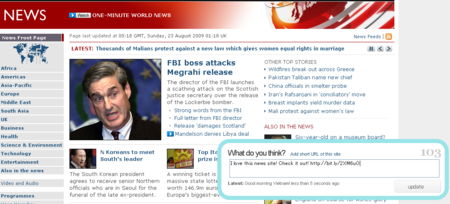
I have just created a tool that allows you to post messages on twitter from any web page. It's called TweetMonkey. This is something like a Twitter version of commonsmarker.com.
Prerequisites
TweetMonkey is a Greasemonkey user script.
Firefox 3 or above with Greasemonkey 0.8 or above must be installed.(My testing environment is Firefox 3.013/Greasemonkey 0.8.3)
Greasemonkey 0.8 is a Firefox plugin and you can get it here.
Greasemonkey allows you to customize Firefox. Ask Dr. Google for details.
How to install
1. Access to the link below with Firefox 3
download TweetMonkey
Install the Greasemonkey by following the instructions.
2. Click a monkey icon at the bottom right corner of Firefox to edit the TweetMonkey source code.
Put your twitter information on the lines of username/password at the beginning of the source code.
3. It's done. Access to any web page to see if a Twitter input box will show up at the bottom right corner of the screen.
How to use
A Twitter input box will show up at the bottom right corner of the screen on any web page. You can enter a short URL by clicking on "Add short URL of this site" link. Tweet by clicking on "Update" button. You can use it just as on Twitter.
Private note
To tell you the truth, I usually use Google Chrome. I don't really use Firefox so often recently. I hear that Chrome can be customize in a similar way to Greasemonkey. Probably, I should give it a try on Chrome.
Any feedback will be greatly appreciated!!
Prerequisites
TweetMonkey is a Greasemonkey user script.
Firefox 3 or above with Greasemonkey 0.8 or above must be installed.(My testing environment is Firefox 3.013/Greasemonkey 0.8.3)
Greasemonkey 0.8 is a Firefox plugin and you can get it here.
Greasemonkey allows you to customize Firefox. Ask Dr. Google for details.
How to install
1. Access to the link below with Firefox 3
download TweetMonkey
Install the Greasemonkey by following the instructions.
2. Click a monkey icon at the bottom right corner of Firefox to edit the TweetMonkey source code.
Put your twitter information on the lines of username/password at the beginning of the source code.
var username = '(your twitter account)';
var password = '(your password)';
3. It's done. Access to any web page to see if a Twitter input box will show up at the bottom right corner of the screen.
How to use
A Twitter input box will show up at the bottom right corner of the screen on any web page. You can enter a short URL by clicking on "Add short URL of this site" link. Tweet by clicking on "Update" button. You can use it just as on Twitter.
Private note
To tell you the truth, I usually use Google Chrome. I don't really use Firefox so often recently. I hear that Chrome can be customize in a similar way to Greasemonkey. Probably, I should give it a try on Chrome.
Any feedback will be greatly appreciated!!
Thursday, August 20, 2009
Failed to write a twitter client bookmarklet
I saw somebody say that we could post your tweets by GET method using twitter API on the internet. This made me excited because it would mean that we could build very easy-to-use client bookmarklets. Before making sure of this information on twitter's official API guide, I started writing code like below. After a while, it turned out that twitter API allows only POST methods when we tweet. That's REST. My dream was short-lived. It's gone now. Sigh.
<html>
<head><title>Twitter Bookmark</title></head>
<body>

<script type="text/javascript">
 (function() {

 // This code does not work for IE6 or below.
 // It is OK since IE6 has died. Good bye IE6!!
     var xmlhttp = false;
    try {
     xmlhttp = new XMLHttpRequest();
   } catch (e) {
     xmlhttp = false;
     }

    if(!xmlhttp) return;

    // Well, you can never update any information by GET method...that's REST.
    xmlhttp.open('GET', 'http://twitter.com/statuses/update.json', false, "twitter_user", "twitter_password");
    xmlhttp.setRequestHeader('Content-Type', 'application/x-www-form-urlencoded');
    xmlhttp.setRequestHeader('X-Twitter-Client', 'TwitterBookmark js by Eiji Sakai');
    xmlhttp.setRequestHeader('X-Twitter-Client-Version', '0.1');
    xmlhttp.setRequestHeader('X-Twitter-Client-URL', 'http://elm200.blogspot.com/');
    xmlhttp.send('status=' + encodeURIComponent("Hello World!"));
    if(xmlhttp.status != 200) alert(xmlhttp.status + ' ' + xmlhttp.statusText);

 })();

</script>

hello

</body>
</html>
Subscribe to:
Posts (Atom)